
When it comes to developing software, it’s important to keep certain information secure. This includes things like passwords, API keys, and other sensitive data that should not be shared publicly. However, it’s all too easy for this type of information to end up in the source code, either by accident or due to a lack of proper security practices.
One way that this can happen is through the use of hard-coded credentials. This means that a developer has included a password or other sensitive information directly in the source code, rather than storing it in a separate configuration file or environment variable. This is a major security risk, as it means that anyone who has access to the source code can easily see and potentially use this sensitive information.
Another issue is the use of secrets in source control systems. Many developers use version control systems, such as Git, to manage their source code. However, if these systems are not configured properly, it’s possible for sensitive information to be committed to the repository and shared publicly.
To prevent these types of security issues, it’s important to follow best practices when it comes to managing credentials and secrets in your source code. This includes things like:
- Storing sensitive information in separate configuration files or environment variables, rather than hard-coding it in the source code.
- Using password management tools to generate and store strong, unique passwords.
- Configuring your version control system to ignore sensitive files or directories, so that they are not committed to the repository.
- Regularly rotating and updating passwords and other sensitive information.
- Use source code secrets detection tools to automatically scan and identify sensitive information, such as passwords and tokens, in the source code
Challenges in managing secrets
- False positives: The tools used for source code secrets detection can sometimes generate false positives, which can be time-consuming and difficult to manage, especially for large codebases.
- False negatives: The tools may not be able to detect all instances of sensitive information, leading to false negatives, which can leave vulnerabilities in the code.
- Scalability: As the codebase grows, the tools need to be able to scale with it, in order to be able to detect secrets in a reasonable time.
- Complexity: Different projects have different requirements and complexity levels, and some tools may not be able to handle certain types of code or programming languages.
- Maintenance: It’s important to keep the tools updated and configured properly to ensure they are effective.
- Evolving threats: As attackers’ techniques evolve, the tools need to be updated to keep up with new types of secrets that could be embedded in the code.
- Human error: Developers may not be aware of all the sensitive data they are handling and may inadvertently include it in the code.
Solution
Vigilant Fiesta is a source code secrets detection tool that utilizes the power of Trufflehog, which not only detects secrets such as passwords, keys, and tokens in source code, but also has a feature for verifying them to reduce false positives. Trufflehog is a tool that uses a combination of regular expressions and entropy analysis to identify sensitive information in code repositories.
The tool can be configured to scan specific file types and directories, and can be integrated with popular version control systems such as Git and SVN. Additionally, it has a feature to verify the secrets that are detected and if they are found to be false positives, they can be tagged accordingly which reduces the number of false positives. This makes Vigilant Fiesta a powerful tool for identifying and mitigating the risk of secrets leaking in source code, while also reducing the burden of manual verification on the developer.
Architecture Diagram and Explanation:
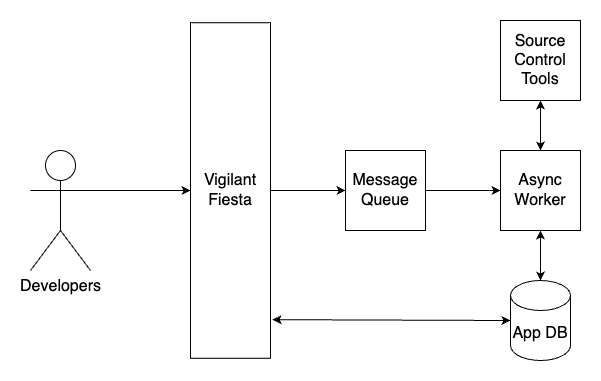
- Security professionals use the Vigilant Fiesta application to trigger scan on repositories.
- If secrets are detected, an alert is triggered and sent to the appropriate team or individual (e.g. security team).
- The alerted team or individual can verify findings to see if they are currently active
- They then review the detected secrets and determines the appropriate action (e.g. removing the secrets from the source code, rotating passwords, etc.).
- If necessary, the team or individual can also implement additional security measures to prevent similar issues from occurring in the future.
- The team or individual can then create pull requests to the repository allowing the secrets to be removed from historical commits.
This architecture allows for automated detection of secrets in source code, as well as a process for handling and addressing any issues that are discovered. By implementing this type of system, organizations can help ensure that their source code is secure and that sensitive information is not accidentally shared publicly.
Remediation
Remediating secrets identified in source code involves taking steps to remove or secure the sensitive information. This can include:
- Removing the secret from the code and replacing it with a placeholder or environment variable.
- Storing the secret in a secure location, such as a password manager or a secure storage service, and ensuring that only authorized personnel have access to it.
- Implementing access controls and logging to track who has accessed the secret and when.
- Regularly reviewing and rotating secrets to ensure that they are still secure and have not been compromised.
- Educating developers and other personnel on the importance of keeping secrets secure and providing them with guidelines for handling sensitive information in code.
- Continuously monitoring the source code for secrets and implementing automated tools to detect secrets in the future.
By following these steps, you can effectively remediate secrets identified in source code, keeping your sensitive information secure and minimizing the risk of data breaches
Pro Tip – BFG Repo-Cleaner
BFG Repo-Cleaner is a tool that can be used to remove secrets from Git repositories. It works by searching for files that match certain patterns, such as files containing the word “password,” and replacing them with a specified replacement value. This process can be used to remove secrets from a repository’s history, making it harder for someone to find and access the sensitive information.
To use BFG Repo-Cleaner, you will first need to download the tool and install it on your machine. Once you have it installed, you can use it to scan your repository and identify files that contain secrets. You can then specify a replacement value to use when removing the secrets. This can be a placeholder or an environment variable, depending on your needs.
For example, to use BFG-repo cleaner to remove secrets from a repository, you can run the following command in the terminal:
bfg --replace-text secrets.txt my-repo.gitWhere ‘secrets.txt’ is the file containing the secrets that you want to remove and ‘my-repo.git’ is the repository that you want to clean up.
Please note that BFG Repo-Cleaner works by rewriting repository’s history so it’s best practice to backup the repository before using it. Also, if the repository is public, it’s best practice to create a new repository and push the cleaned history to it.
Overall, BFG Repo-Cleaner can be a powerful tool for removing secrets from Git repositories, making it harder for someone to find and access the sensitive information.


Leave a Reply